Here is a short script that gets all criteria groups from Entra ID, creating a report over which attributes are in use:
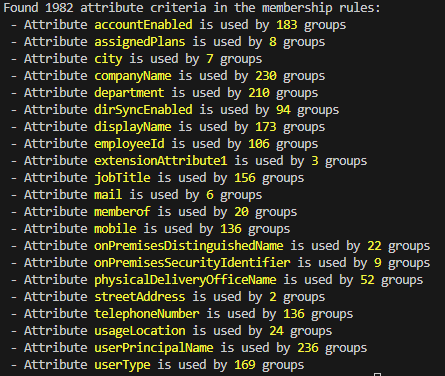
The script will output a text based report summarizing the attribute usage, as well as Out-GridView (Excel-ish) each entry, allowing you to figure out exactly which groups are using which attributes.
Simply store the below file as file.ps1, connet to Microsoft graph using Connect-MgGraph -Scope Group.Read.All and run the file using . ./file.ps1
[CmdletBinding()]
Param(
    [Parameter(Mandatory = $false)]
    [Switch] $IgnoreProcessingState
)

# Get all dynamic groups
$criteriaGroups = Get-MgGroup -All -Property id, displayName, membershipRule, membershipRuleProcessingStatus, membershipRuleProcessingState -Filter "groupTypes/any(c:c eq 'DynamicMembership')"

$count = $criteriaGroups | Measure-Object | Select-Object -ExpandProperty Count
if($count -eq 0) {
    Write-Host "No dynamic groups found."
} else {
    Write-Host "$count dynamic groups found."

    # Loop through each group and get the membership rule
    $criteriaReport = $criteriaGroups |
    ForEach-Object {
        $group = $_ # $group = $criteriaGroups | get-random -count 1
        Write-Host "Processing group $($PSStyle.Foreground.BrightYellow)'$($group.displayName)'$($PSStyle.Reset) ($($group.id))"

        # Check if the group is in 'On' state
        if(!$IgnoreProcessingState.IsPresent -and $group.MembershipRuleProcessingState -ne "On") {
            Write-Host "Group $($group.displayName) is not in 'On' state. Skipping..." -ForegroundColor Yellow
            return
        }

        # Extract the attributes from the membership rule
        $attributes = [Regex]::Matches($group.MembershipRule, 'user\.[a-zA-Z0-9_]+')
        if($attributes) {
            $attributes.Value |
            ForEach-Object {$_.Replace('user.', '')} |
            Sort-Object -Unique |
            ForEach-Object {
                [PSCustomObject] @{
                    GroupName = $group.displayName
                    GroupId = $group.id
                    Attribute = $_
                }
            }
        } else {
            Write-Host "Unable to find any user attributes in the membership rule for group $($group.displayName). This can be because it is a memberof group query, or a device group."
        }
    }

    Write-Host "Found $($criteriaReport.Count) attribute criteria in the membership rules:"
    $criteriaReport |
    Group-Object attribute |
    Sort-Object Name |
    ForEach-Object {
        Write-Host " - Attribute $($PSStyle.Foreground.BrightYellow)$($_.Name)$($PSStyle.Reset) is used by $($PSStyle.Foreground.BrightYellow)$($_.Count)$($PSStyle.Reset) groups"
    }

    $criteriaReport |
    Out-GridView
}

 Good Workaround!